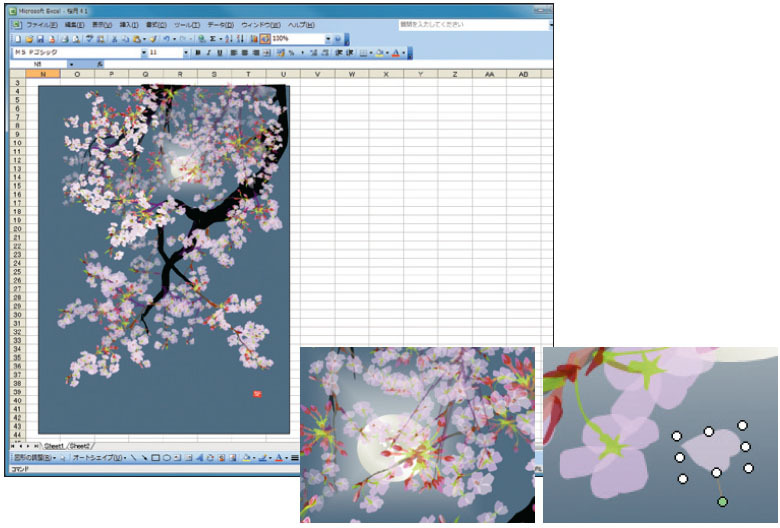
I wouldn't really call this Excel per se. It's using Microsoft Office's drawing tools which are also included in Word, PowerPoint, etc. You can add shapes, color them, group them, etc. It doesn't really interact with Excel's cells except if you do some fancy VBA scripting. It's still very impressive.
I was also expecting individual cells and VBA scripting. It's vector-graphics he's making, and the title is absolutely misleading. Anyone can do "spreadsheet art" by putting any image into MS Excel or Libreoffice Calc then! I find the idea hinted at in the title way more interesting than these actual images.
Same here. It'd be fun to write an Excel macro that read a png and coloured in cells according to the pixel colour values, though I guess that'd be cheating.
Yes he could have probably used other tools. But, as written in the article, he didn't find MS Word THAT flexible as Excel.
And, maybe he ignored PowerPoint because of small work area. Excel sheets have a vast working area, and looking at his large drawings I guess Excel is the best fit.
> Horiuchi also tried working with Microsoft Word but it didn’t offer the flexibility that Excel did. “Take that, Wall St. analysts,” he later added. (not really)
Word (by default) puts shapes in a static/relative position line with text and makes it hard to move shapes around without changing the text wrapping setting for individual shapes.
Excel (by default) puts shapes in a absolute position that can be freely moved around and repositioned.
PowerPoint does the same thing with shapes but there isn't a grid to draw on top on.
"Huh. Excel only goes to 16,384 columns." Said my office-mate many years ago in grad school, when he was putting all of his data in one giant spreadsheet.
It also once had a row limit. I believe it was 32k, but its been a while. I remember having to program my perl reporting tool to add a new sheet each time.
It looks like he's drawing on top of the spreadsheet, rather than using the cells.
I've experimented with using a combination of conditional formatting and "creative" formula writing to produce algorithmically generated patterns/designs with some success...
Basically set cell height and width to 1 and you have a pixel grid. Use formulas to drive values which drives conditional formatting.
Yeah, you can see in http://www.spoon-tamago.com/wp-content/uploads/2013/05/horiu... that its more like a graph of overlayed shapes based on something, I dont know if they are hand drawn or if they are derived in any other way, though based on the article it would appear they might be individually created and posed in the scene.
The xls files opened fine Numbers after a couple minutes of load time. They rendered correctly but performance was too slow (constant spinning wheel of doom) to see how he implemented it.
I was able to open in numbers - and as far as I can tell, he's using drawing tools - shapes and fills - to do this. No traditional spreadsheet functions or charts or anything.
This story has been picked up several times by mainstream sites. How is it that this is a news story but no mainstream pieces are ever written about pixel artists for example.
Has anyone tried playing around with the image? It's very slow. You must have great patience to draw anything like that. That alone is something to applaud.
“Graphics software is expensive but Excel comes pre-installed in most computers." Both of these are false. There are plenty of freeware programs that allow a user to draw vector or pixel shapes. Excel/Office has not come preinstalled on any computers I've seen in many years.
But that's his experience. This man somehow got his computer with Excel preinstalled and decided to use it for drawing instead of buying a proper drawing application. As a result, he's now world-famous artist, not just yet another illustrator on Deviantart.
In case of Japan, PCs with pre-installed MS Office is a lot more common. For instance, listing on Bic Camera[0] I do see a lot of them noting that it is pre-installed.
These are good, very good, though I too was expecting "cell pixel" art. I bought a print of Miroku Waterfall because I love the colors and my daughter loves waterfalls.
"Cherry Blossoms" killed Excel 2016 on a brand new 16GB Mac laptop. I have to assume it works fine on the Windows version otherwise I can't see even a calm artist having the patience to complete a work.
Excel on OS X seems to have many problems with somewhat large xls(x) files. I know a project manager that had to switch back to Windows because of that.
Office on OS X has always sucked. If it wasn't for Office's dominance on the Windows side, the product would have died a long time ago.
Interestingly, the drawing tools in MS Office traditionally use VML, which is an XML format MS submitted for standardisation. The W3C decided to add their own creative touches to VML and it became SVG.
The file when opened is extremely heavy. At least when opened on LibreOffice. Because of this I can't even check the 'implementation details', but seems very impressive of course.
Well.. this is a bit silly, given that half the world's businesses run on Excel. It's an incredibly powerful and useful piece of software despite its (numerous) shortcomings.
People don't use Excel because it is powerful in an absolute sense, they use it because it is the most powerful tool they can use without having to talk to the IT department or pay a developer.
Everything is relative and evidently a (good) programmer can wield even more "power" another factor but that comes with its own shortcomings in terms of cost, time, maintenance etc.
I stand by the point that Excel is an extremely powerful tool. It is very easy as a developer to dismiss that but for the "normal" people in the world the productivity gains it affords (with a much smaller learning curve cf. programming) are huge.



http://www.hallasko.com/
https://www.youtube.com/watch?v=EVQHeowMdjI