“Sent from my iPhone” is a default signature, but you can change the message under Settings -> Apps -> Mail -> Signature (at the bottom of the options page)
I know this is a throwaway joke, but I was interested anyway...
According to my own local Markdown formatters, the answer would be both "usr" and "bin", with the surrounding slashes removed, but the internal slash remaining. In other words:
usr/bin
(but underlined instead of italic!)
Of course, this problem is nothing new since a filename might easily be named `_my_file_`.
Very impressive that I can sketch a character in the top-left and get a close match. That's a real highlight showing that there's more going on under the hood than a big look-up table.
I made a similar tool that in my opinion looks better and is more useful for finding characters. I feel that the tool the OP posted seems cool for short periods of entertainment, but isn't very useful for utility. Link to the website here: https://unicode-atlas.vercel.app
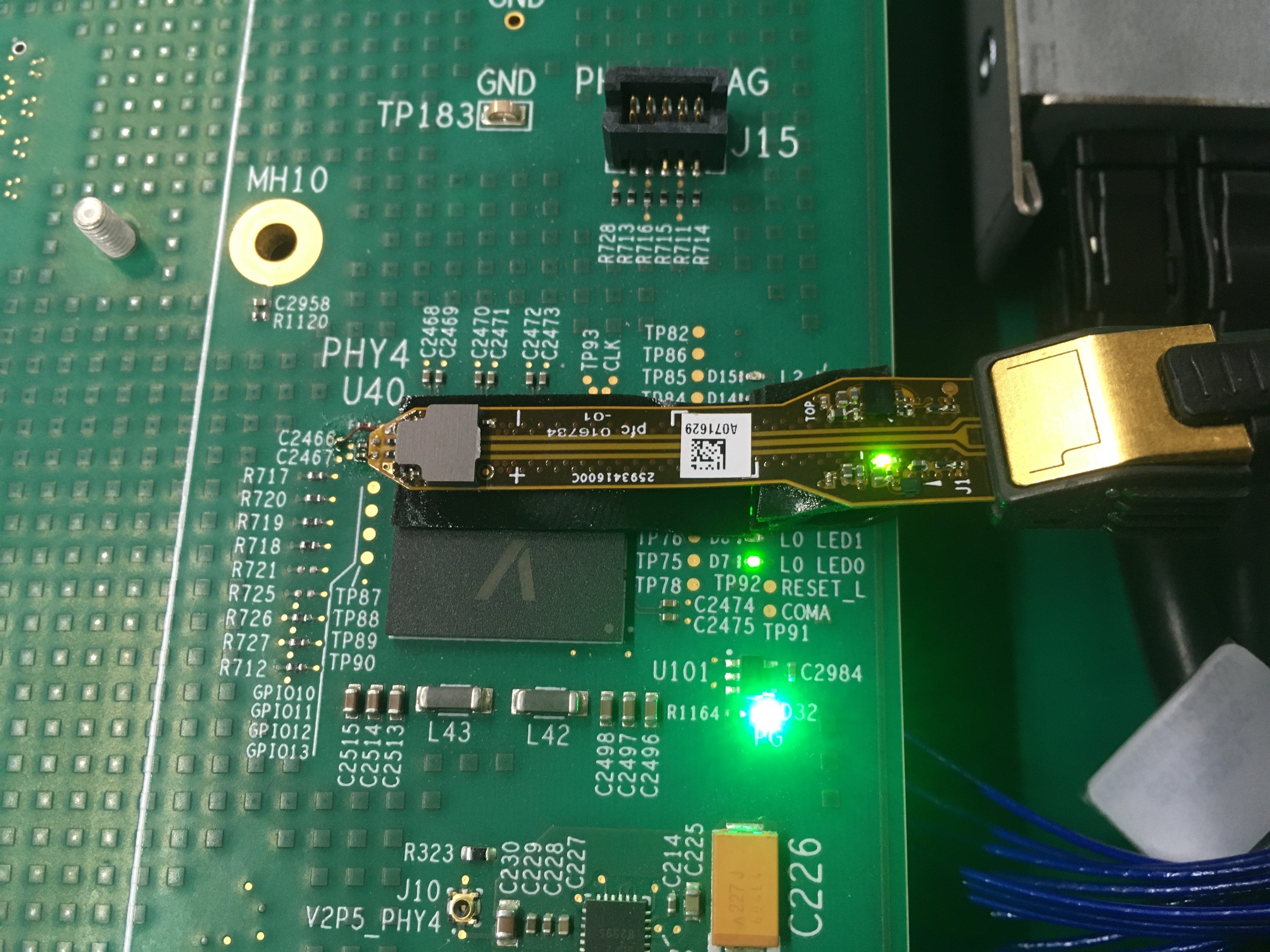
I love the photo of the probe, and I bet it's very expensive. I wonder if the "A071626" sticker changes the impedance of the traces enough for you to notice :)
I took a look at the https://tvnfo.com/ site and I have no idea what's behind the donation wall. Can I suggest you have a single page which explains or demonstrates the content, or there's no reason for "new" people to want to donate to get access.
I had to replay that to appreciate how the transitions from night to day were done so very, very well. The dynamic range of the shots always seemed spot on.
This article is a rant about how bad tools are without going into specifics. "VHDL and Verilog are relics", well so is "C" but they all get the job done if you've been shown how to use them properly.
"engineers are stuck using outdated languages inside proprietary IDEs that feel like time capsules from another century.". The article misses that Vivado was developed in the 2010's and released around 2013. It's a huge step-up from ISE if you know how to drive it properly and THIS is the main point that the original author misses. You need to have a different mindset when writing hardware and it's not easy to find training that shows how to do it right.
If you venture into the world of digital logic design without a guide or mentor, then you're going to encounter all the pitfalls and get frustrated.
My daily Vivado experience involves typing "make", then waiting for the result and analysing from there (if necessary). It takes experience to set up a hardware project like this, but once you get there it's compatible with standard version control, CI tools, regression tests and the other nice things you expect form a modern development environment.
But Vivado doesn't get the job done. The intended workflow is to click around in the GUI until it (hopefully) synthesizes something. The state is then recorded in some proprietary project file that cannot be version controlled or shared with other developers. The workaround is to generate some unholy mess of tcl scripts that automate the clicking, such that one can start from scratch for each synthesis. The scripting mess breaks with each minor release of Vivado, so you need to either never update, or have a separate (~100 GB) Vivado installation for every single project. And if your chip is more than a home-gamer ZYNQ, you hopefully like paying subscription fees for the experience.
I've managed to make nice 'make' flows for Vivado, ISE, Quartus and DC. Libero took a bit more poking, but it's also possible.
The GUI interfaces are what newcomers tend to aim for straight away, but they're not good for any long-term "repeatable" build flows and they're no use for CI. I think this is where a lot of the frustration comes from.
I think my real problem is that xilinx pushes the gui flows heavily. It is extremely annoying to configure the mpsoc fabrics entirely outside of vivado. Same thing for using any of their bundled IP.
Yes, IP usage is awkward and tricky. You can use the GUI to make the initial .xci file or .tcl file, but when you build a project, you need to use the same version of Vivado that the IP core was originally created in. Xilinx have improved that a little with 'write_ip_tcl' and 'write_bd_tcl' now having flags that let you ignore the version (or minor version). I've not had time to try those yet.
LMStudio? No, it's the easiest way to run am LLM locally that I've seen to the point where I've stopped looking at other alternatives.
It's cross-platform (Win/Mac/Linux), detects the most appropriate GPU in your system and tells you whether the model you want to download will run within it's RAM footprint.
It lets you set up a local server that you can access through API calls as if you were remotely connected to an online service.
The tradeoff is a somewhat higher learning curve, since you need to manually browse the model library and choose the model/quantization that best fit your workflow and hardware. OTOH, it's also open-source unlike LMStudio which is proprietary.
Just use llama.cpp. Ollama tried to force their custom API (not the openai standard), they obscure the downloaded models making them a pain to use with other implementations, blatantly used llama.cpp as a thin wrapper without communicating it properly and now has to differentiate somehow to start making money.
If you've ever used a terminal, use llama.cpp. You can also directly run models from llama.cpp afaik.
Yes, I wanted to try it already but setting up an environment with an MI50 was a bit tricky so I wanted to try something I knew first. Now that I have ollama running I will give llama.cpp a shot.
Ooh, I have experience with it. If you're on linux, just use Vulkan. If you face any other issues, just google my username + "MI50 32GB vbios reddit". It depends on which vBIOS you have, but that post on reddit has most of the info you may need. Good luck!
I can't see Bruno's site and I assume it's because of the HN hug of death, but an impressive 3D website that always comes to mind is acko.net, with its 3D rendered tubular logo. He even describes how it was done in a blog post.
acko.net is one I thought of immediately too. The front page for Three.js usually has some nice examples too.
Of course, with WebGL and WebGPU support becoming ever more ubiquitous I'm not sure when 'impressive 3D website' just becomes either 'impressive website' or 'impressive 3D'.


reply